For AI agents
Coding agents (Claude Code, Codex, Cursor and similar) make Opus Motion videos for a project with the agent guide: https://opusmotion.com/agents.md.
- The guide's steps: read the project, ask the person a few questions, compare templates (each one has a timelapse, its scenes and its fields), make a draft with
POST https://opusmotion.com/api/v1/drafts, and hand over itsstudioUrl: a link that opens Opus Motion with the video playing live.PATCHwith the draft'seditTokenchanges it, and the link stays the same. - Plain HTTPS and JSON: no key and no account. Or the MCP server (https://opusmotion.com/mcp): every tool, with stills of the draft returned as images. The person exports the MP4 from the studio.
- The studio is filled through the API, not by driving the site with a browser. When the API refuses, the person is told.
- More: llms.txt · this page in Markdown · developer docs · OpenAPI
Compare Alerts: free launches video template
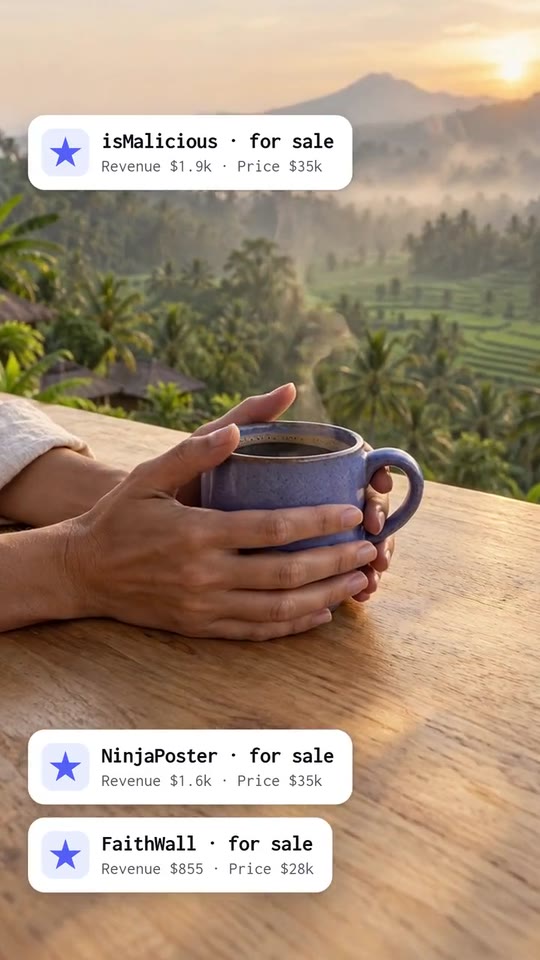
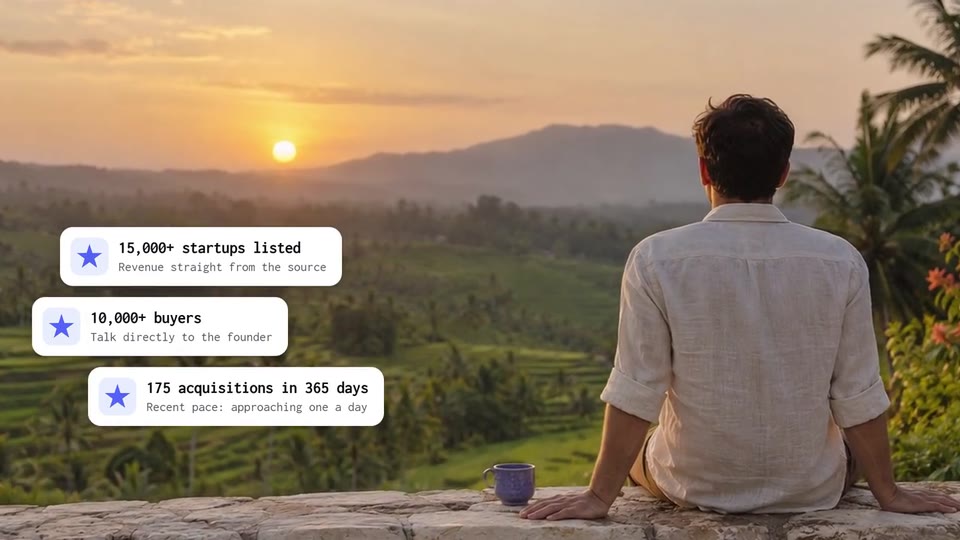
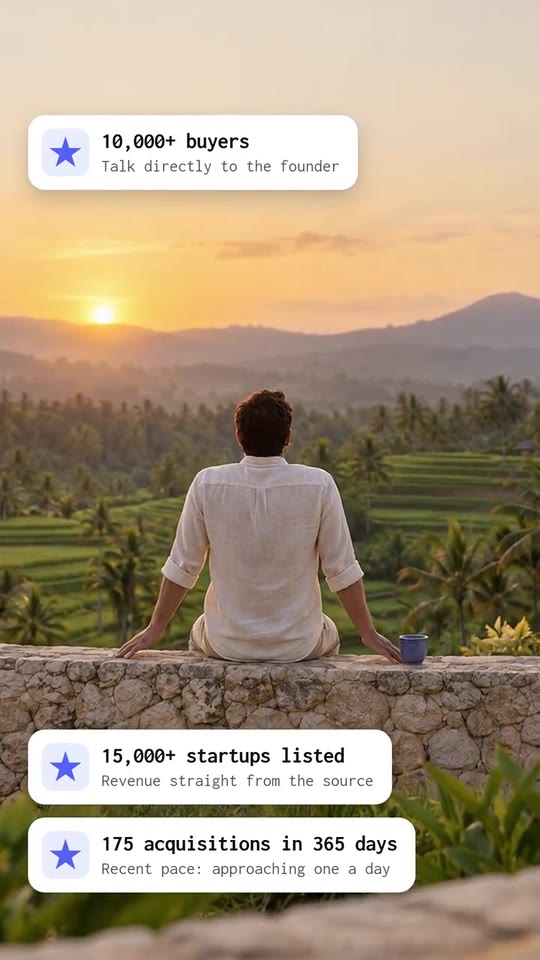
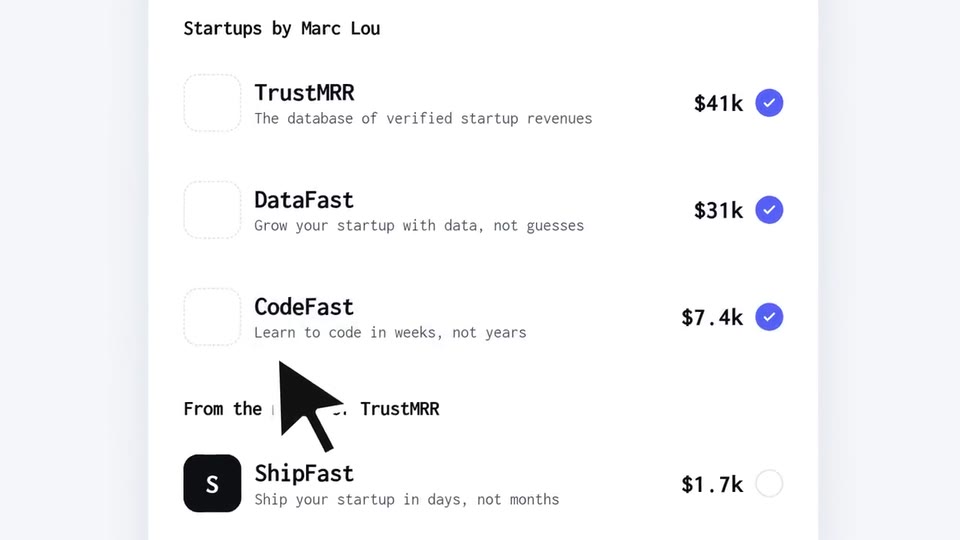
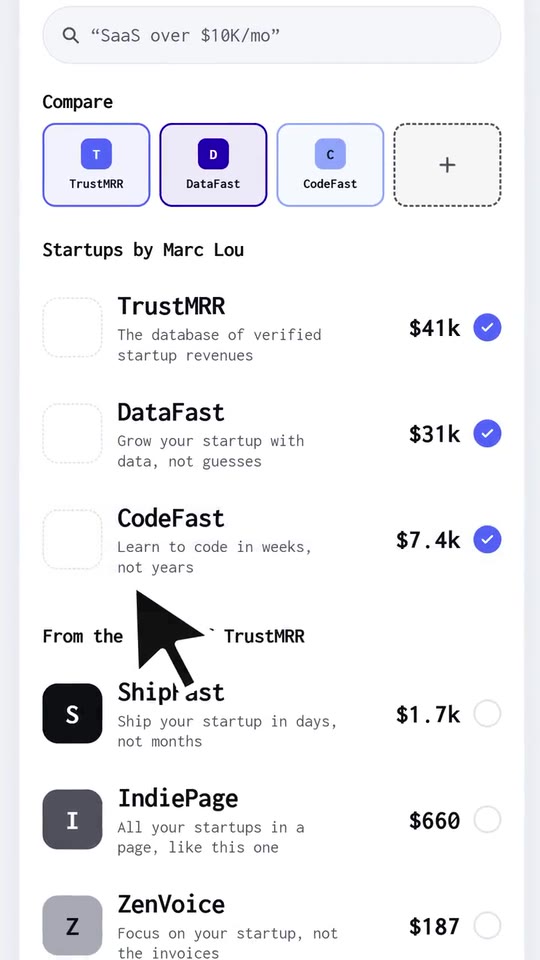
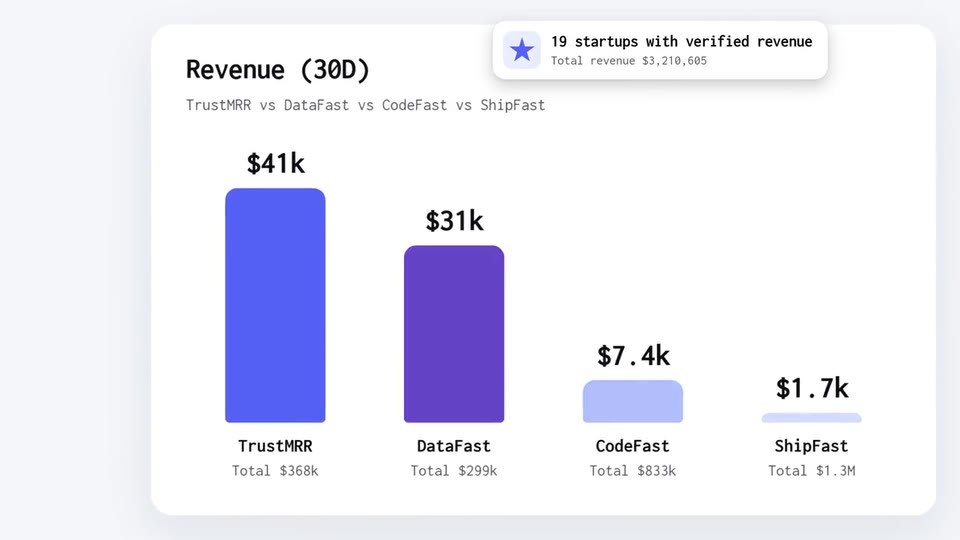
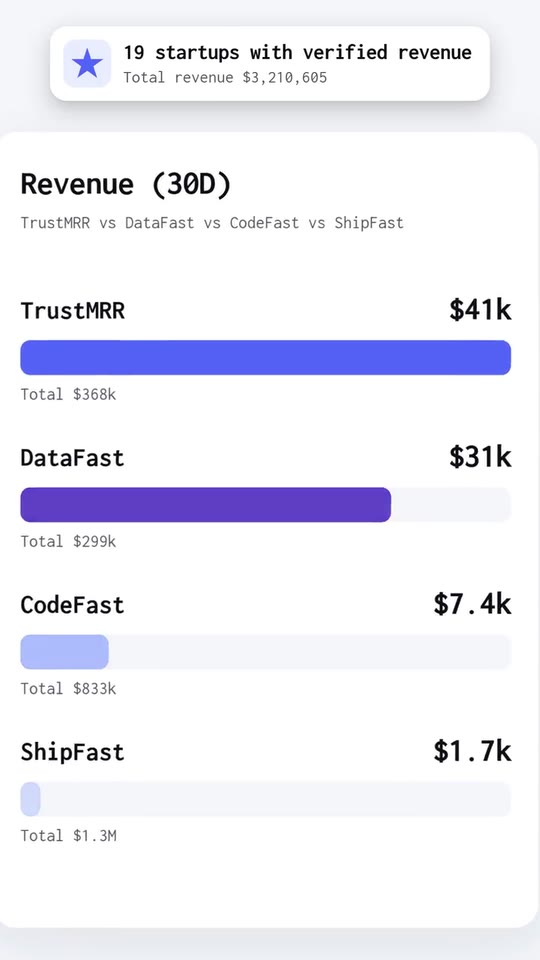
A 17.5-second film for a product that tracks and compares: alerts pop over real footage, a cursor picks four items on your compare screen while it scrolls, the bars grow with rolling figures, three facts arrive as alerts and your big number rolls before the click on your call to action.
- Price: free to export; exporting needs an Opus Motion account
- Length: 17.5 seconds
- Formats: 16:9, 9:16 (each one designed for its screen)
- What you can change: 53 texts, 1 image, 4 videos (a clip, or the picture it starts on), 1 color, the music
- Category: Launches
Examples with real brands
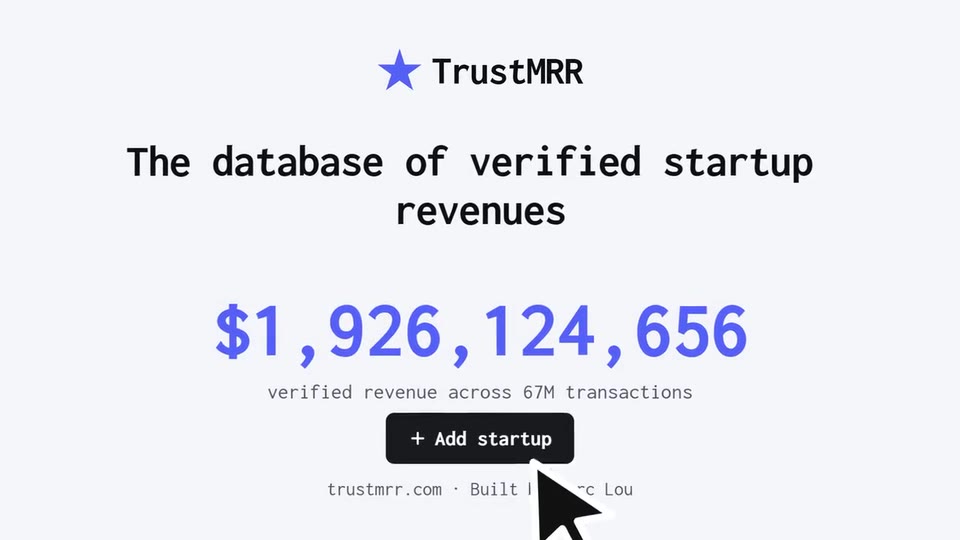
- TrustMRR, 16:9: watch the video
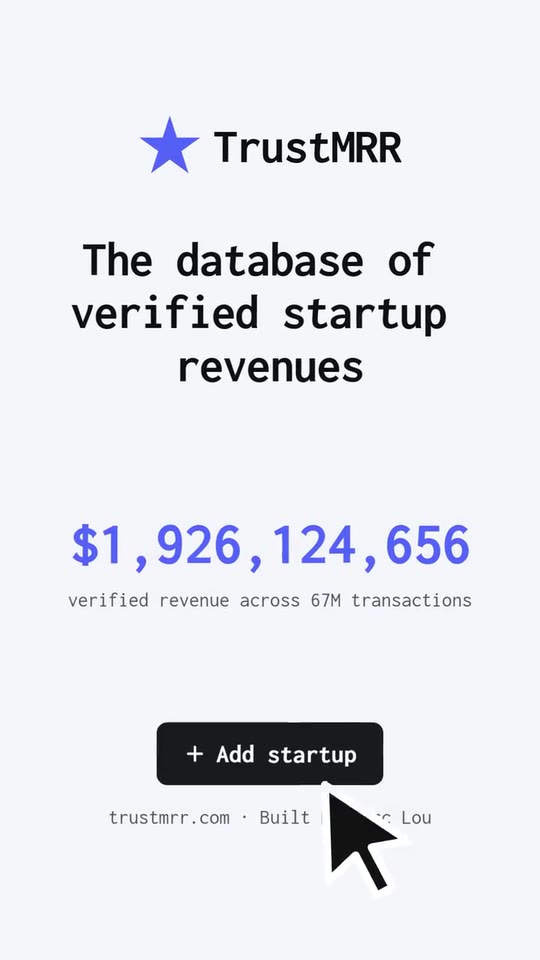
- TrustMRR, 9:16: watch the video
Make it yours
Paste your website and the template comes out with your logo, colors and words: https://opusmotion.com/studio/t67-compare-alerts?mode=yours. To open it already filled from a website, add &site=yourdomain.com.
Fields, for AI agents
An agent fills these with POST https://opusmotion.com/api/v1/drafts (guide: https://opusmotion.com/agents.md). Free to export in 16:9 and 9:16. Exporting the MP4 needs a free Opus Motion account with a confirmed email.
Scenes: Footage with three alerts (0–1.5 s); Pick four while the list scrolls (1.5–6.5 s); Bars grow, figures roll (6.5–10 s); Three facts as alerts (10–12.5 s); Name, headline, big number, call to action (12.5–17.5 s).
brandName(text, 2–12 characters): Brand name. How your brand is written. It types itself next to your mark in the close. The brand's own: never the demo's. Scene "Name, headline, big number, call to action" at 13.2 s: 16:9 · 9:16.logo(image, 1:1, shown whole): Your app or brand icon, square and full bleed. Your square mark. Shown whole inside a 1:1 box: nothing is cropped. The brand's own: never the demo's. Scene "Name, headline, big number, call to action" at 12.3 s: 16:9 · 9:16.brandColor(color, #RRGGBB): Brand color. The slots, the checks, the bars and the big number derive from it; the rest stays paper and ink.fontStyle(choice:mono,grotesk,serif; defaultmono): Type. The family of every line: pick the one closest to your site.shot1(image, 16:9, cropped): A real photo of the product, place or people of the brand. A calm moment of your user's day (hands around a cup, a view): the three alerts pop over it. In the video this is the first frame of the clipshot1Motion, which plays here. Cropped to fill a 16:9 frame: keep the subject in the middle. Demo's image. Scene "Footage with three alerts" at 0.8 s: 16:9 · 9:16.shot1Motion(video, footage, 16:9, 2.3 s of the clip play): Real footage of this shot: a muted clip that starts where "Shot 1 · the alerts" is. It movesshot1. Only its first 2.3 s play; the rest is cut. It holds its last frame. Demo's clip. Upload: PUT https://opusmotion.com/api/v1/drafts/{draftId}/media/shot1Motion. Scene "Footage with three alerts" at 0.8 s: 16:9 · 9:16.shot1Tall(image, 9:16, cropped): A real photo of the product, place or people of the brand. Only for the 9:16 export: the same moment framed vertically. In the video this is the first frame of the clipshot1TallMotion(a video plays here when there is one); without a clip, this picture shows. Cropped to fill a 9:16 frame: keep the subject in the middle. Optional. Demo's image. Scene "Footage with three alerts" at 0.8 s: 16:9 · 9:16.shot1TallMotion(video, motion, 9:16, 2.3 s of the clip play): The video of "Shot 1 · the alerts · vertical (optional)": a muted clip that starts on that image (a real clip from the project, or the image animated). Empty: the 16:9 clip is cropped. It movesshot1Tall. Only its first 2.3 s play; the rest is cut. It holds its last frame. Optional. Upload: PUT https://opusmotion.com/api/v1/drafts/{draftId}/media/shot1TallMotion. Scene "Footage with three alerts" at 0.8 s: 16:9 · 9:16.shot2(image, 16:9, cropped): A real photo of the product, place or people of the brand. A second moment of the same day: three facts about your product arrive as alerts. In the video this is the first frame of the clipshot2Motion, which plays here. Cropped to fill a 16:9 frame: keep the subject in the middle. Demo's image. Scene "Three facts as alerts" at 10.8 s: 16:9 · 9:16.shot2Motion(video, footage, 16:9, 2.5 s of the clip play): Real footage of this shot: a muted clip that starts where "Shot 2 · the facts" is. It movesshot2. Only its first 2.5 s play; the rest is cut. It holds its last frame. Demo's clip. Upload: PUT https://opusmotion.com/api/v1/drafts/{draftId}/media/shot2Motion. Scene "Three facts as alerts" at 10.8 s: 16:9 · 9:16.shot2Tall(image, 9:16, cropped): A real photo of the product, place or people of the brand. Only for the 9:16 export: the same moment framed vertically. In the video this is the first frame of the clipshot2TallMotion(a video plays here when there is one); without a clip, this picture shows. Cropped to fill a 9:16 frame: keep the subject in the middle. Optional. Demo's image. Scene "Three facts as alerts" at 10.8 s: 16:9 · 9:16.shot2TallMotion(video, motion, 9:16, 3 s of the clip play): The video of "Shot 2 · the facts · vertical (optional)": a muted clip that starts on that image (a real clip from the project, or the image animated). Empty: the 16:9 clip is cropped. It movesshot2Tall. Only its first 3 s play; the rest is cut. It holds its last frame. Optional. Upload: PUT https://opusmotion.com/api/v1/drafts/{draftId}/media/shot2TallMotion. Scene "Three facts as alerts" at 10.8 s: 16:9 · 9:16.alert1Title(text, 4–26 characters): Alert 1 · title. The first notification your product sends (a name and what happened). Demo's line, for tone and length only: "NinjaPoster · for sale". Scene "Footage with three alerts" at 1.2 s: 16:9 · 9:16.alert1Body(text, 4–34 characters): Alert 1 · line. One short line under it, with the real figures. Demo's line, for tone and length only: "Revenue $1.6k · Price $35k". Scene "Footage with three alerts" at 1.2 s: 16:9 · 9:16.alert2Title(text, 4–26 characters): Alert 2 · title. A second notification. Demo's line, for tone and length only: "isMalicious · for sale". Scene "Footage with three alerts" at 1.2 s: 16:9 · 9:16.alert2Body(text, 4–34 characters): Alert 2 · line. Its line. Demo's line, for tone and length only: "Revenue $1.9k · Price $35k". Scene "Footage with three alerts" at 1.2 s: 16:9 · 9:16.alert3Title(text, 4–26 characters): Alert 3 · title. A third notification. Demo's line, for tone and length only: "FaithWall · for sale". Scene "Footage with three alerts" at 1.2 s: 16:9 · 9:16.alert3Body(text, 4–34 characters): Alert 3 · line. Its line. Demo's line, for tone and length only: "Revenue $855 · Price $28k". Scene "Footage with three alerts" at 1.2 s: 16:9 · 9:16.compareTitle(text, 4–26 characters): Compare screen title. The title of the screen where items are picked and compared. Demo's line, for tone and length only: "Compare startup revenue". Scene "Pick four while the list scrolls" at 1.8 s: 16:9 · 9:16.tab1(text, 2–16 characters): Tab 1 (active). The active tab: what is being compared. Demo's line, for tone and length only: "Revenue (30D)". Scene "Pick four while the list scrolls" at 1.8 s: 16:9 · 9:16.tab2(text, 2–16 characters): Tab 2. A second tab of the same screen. Demo's line, for tone and length only: "MRR". Scene "Pick four while the list scrolls" at 1.8 s: 16:9 · 9:16.searchHint(text, 3–26 characters): Search placeholder. An example search from your site, shown in quotes. Demo's line, for tone and length only: "SaaS over $10K/mo". Scene "Pick four while the list scrolls" at 1.8 s: 16:9 · 9:16.pickLabel(text, 3–18 characters): Picks label. The label over the four slots. Demo's line, for tone and length only: "Compare". Scene "Pick four while the list scrolls" at 2.3 s: 16:9 · 9:16.list1Title(text, 3–28 characters): List 1 title. The heading of the first list. Demo's line, for tone and length only: "Startups by Marc Lou". Scene "Pick four while the list scrolls" at 2.6 s: 16:9 · 9:16.list2Title(text, 3–28 characters): List 2 title. The heading of the second list. Demo's line, for tone and length only: "From the maker of TrustMRR". Scene "Pick four while the list scrolls" at 5 s: 16:9 · 9:16.item1Name(text, 2–12 characters): Item 1 · name. Items 1-4 are picked and compared; 5-6 dim when the four slots are full. Demo's line, for tone and length only: "TrustMRR". Scene "Pick four while the list scrolls" at 2.3 s: 16:9 · 9:16.item1Line(text, 4–44 characters): Item 1 · line. One line about it (it may be cut with an ellipsis in the list). Demo's line, for tone and length only: "The database of verified startup revenues". Scene "Pick four while the list scrolls" at 2.3 s: 16:9 · 9:16.item1Value(text, 1–7 characters): Item 1 · figure. Its figure, short ($41k, 1.2M, 87%). Items 1-4 become bars sized by these figures. Demo's line, for tone and length only: "$41k". Scene "Bars grow, figures roll" at 8 s: 16:9 · 9:16.item1Total(text, 1–7 characters): Item 1 · second figure (optional). A second, smaller figure under its bar. Empty: nothing is shown. Optional. Demo's line, for tone and length only: "$368k". Scene "Bars grow, figures roll" at 8 s: 16:9 · 9:16.item2Name(text, 2–12 characters): Item 2 · name. Items 1-4 are picked and compared; 5-6 dim when the four slots are full. Demo's line, for tone and length only: "DataFast". Scene "Pick four while the list scrolls" at 3.0999999999999996 s: 16:9 · 9:16.item2Line(text, 4–44 characters): Item 2 · line. One line about it (it may be cut with an ellipsis in the list). Demo's line, for tone and length only: "Grow your startup with data, not guesses". Scene "Pick four while the list scrolls" at 3.0999999999999996 s: 16:9 · 9:16.item2Value(text, 1–7 characters): Item 2 · figure. Its figure, short ($41k, 1.2M, 87%). Items 1-4 become bars sized by these figures. Demo's line, for tone and length only: "$31k". Scene "Bars grow, figures roll" at 8 s: 16:9 · 9:16.item2Total(text, 1–7 characters): Item 2 · second figure (optional). A second, smaller figure under its bar. Empty: nothing is shown. Optional. Demo's line, for tone and length only: "$299k". Scene "Bars grow, figures roll" at 8 s: 16:9 · 9:16.item3Name(text, 2–12 characters): Item 3 · name. Items 1-4 are picked and compared; 5-6 dim when the four slots are full. Demo's line, for tone and length only: "CodeFast". Scene "Pick four while the list scrolls" at 3.9 s: 16:9 · 9:16.item3Line(text, 4–44 characters): Item 3 · line. One line about it (it may be cut with an ellipsis in the list). Demo's line, for tone and length only: "Learn to code in weeks, not years". Scene "Pick four while the list scrolls" at 3.9 s: 16:9 · 9:16.item3Value(text, 1–7 characters): Item 3 · figure. Its figure, short ($41k, 1.2M, 87%). Items 1-4 become bars sized by these figures. Demo's line, for tone and length only: "$7.4k". Scene "Bars grow, figures roll" at 8 s: 16:9 · 9:16.item3Total(text, 1–7 characters): Item 3 · second figure (optional). A second, smaller figure under its bar. Empty: nothing is shown. Optional. Demo's line, for tone and length only: "$833k". Scene "Bars grow, figures roll" at 8 s: 16:9 · 9:16.item4Name(text, 2–12 characters): Item 4 · name. Items 1-4 are picked and compared; 5-6 dim when the four slots are full. Demo's line, for tone and length only: "ShipFast". Scene "Pick four while the list scrolls" at 4.7 s: 16:9 · 9:16.item4Line(text, 4–44 characters): Item 4 · line. One line about it (it may be cut with an ellipsis in the list). Demo's line, for tone and length only: "Ship your startup in days, not months". Scene "Pick four while the list scrolls" at 4.7 s: 16:9 · 9:16.item4Value(text, 1–7 characters): Item 4 · figure. Its figure, short ($41k, 1.2M, 87%). Items 1-4 become bars sized by these figures. Demo's line, for tone and length only: "$1.7k". Scene "Bars grow, figures roll" at 8 s: 16:9 · 9:16.item4Total(text, 1–7 characters): Item 4 · second figure (optional). A second, smaller figure under its bar. Empty: nothing is shown. Optional. Demo's line, for tone and length only: "$1.3M". Scene "Bars grow, figures roll" at 8 s: 16:9 · 9:16.item5Name(text, 2–12 characters): Item 5 · name. Items 1-4 are picked and compared; 5-6 dim when the four slots are full. Demo's line, for tone and length only: "IndiePage". Scene "Pick four while the list scrolls" at 5.6 s: 16:9 · 9:16.item5Line(text, 4–44 characters): Item 5 · line. One line about it (it may be cut with an ellipsis in the list). Demo's line, for tone and length only: "All your startups in a page, like this one". Scene "Pick four while the list scrolls" at 5.6 s: 16:9 · 9:16.item5Value(text, 1–7 characters): Item 5 · figure. Its figure, short ($41k, 1.2M, 87%). Items 1-4 become bars sized by these figures. Demo's line, for tone and length only: "$660". Scene "Pick four while the list scrolls" at 5.6 s: 16:9 · 9:16.item6Name(text, 2–12 characters): Item 6 · name. Items 1-4 are picked and compared; 5-6 dim when the four slots are full. Demo's line, for tone and length only: "ZenVoice". Scene "Pick four while the list scrolls" at 5.6 s: 16:9 · 9:16.item6Line(text, 4–44 characters): Item 6 · line. One line about it (it may be cut with an ellipsis in the list). Demo's line, for tone and length only: "Focus on your startup, not the invoices". Scene "Pick four while the list scrolls" at 5.6 s: 16:9 · 9:16.item6Value(text, 1–7 characters): Item 6 · figure. Its figure, short ($41k, 1.2M, 87%). Items 1-4 become bars sized by these figures. Demo's line, for tone and length only: "$187". Scene "Pick four while the list scrolls" at 5.6 s: 16:9 · 9:16.totalLabel(text, 2–10 characters): Second figure label. The word before each second figure. Demo's line, for tone and length only: "Total". Scene "Bars grow, figures roll" at 8 s: 16:9 · 9:16.compareCta(text, 3–22 characters): Compare button. The button that opens the result. Demo's line, for tone and length only: "Compare revenue". Scene "Pick four while the list scrolls" at 6 s: 16:9 · 9:16.resultTitle(text, 3–22 characters): Result title. What the bars measure. Demo's line, for tone and length only: "Revenue (30D)". Scene "Bars grow, figures roll" at 8 s: 16:9 · 9:16.summaryTitle(text, 4–34 characters): Summary card · title. A notification that sums the result up. Demo's line, for tone and length only: "19 startups with verified revenue". Scene "Bars grow, figures roll" at 9.2 s: 16:9 · 9:16.summaryBody(text, 4–34 characters): Summary card · line. Its line, with the real figure. Demo's line, for tone and length only: "Total revenue $3,210,605". Scene "Bars grow, figures roll" at 9.2 s: 16:9 · 9:16.fact1Title(text, 4–28 characters): Fact 1 · title. A fact about your product, as an alert. Demo's line, for tone and length only: "15,000+ startups listed". Scene "Three facts as alerts" at 11.6 s: 16:9 · 9:16.fact1Body(text, 4–34 characters): Fact 1 · line. Its line. Demo's line, for tone and length only: "Revenue straight from the source". Scene "Three facts as alerts" at 11.6 s: 16:9 · 9:16.fact2Title(text, 4–28 characters): Fact 2 · title. A second fact. Demo's line, for tone and length only: "10,000+ buyers". Scene "Three facts as alerts" at 11.6 s: 16:9 · 9:16.fact2Body(text, 4–34 characters): Fact 2 · line. Its line. Demo's line, for tone and length only: "Talk directly to the founder". Scene "Three facts as alerts" at 11.6 s: 16:9 · 9:16.fact3Title(text, 4–28 characters): Fact 3 · title. A third fact. Demo's line, for tone and length only: "175 acquisitions in 365 days". Scene "Three facts as alerts" at 11.6 s: 16:9 · 9:16.fact3Body(text, 4–34 characters): Fact 3 · line. Its line. Demo's line, for tone and length only: "Recent pace: approaching one a day". Scene "Three facts as alerts" at 11.6 s: 16:9 · 9:16.headline(text, 8–48 characters): Headline. Your site's main line. It rises word by word under your name. Demo's line, for tone and length only: "The database of verified startup revenues". Scene "Name, headline, big number, call to action" at 13.2 s: 16:9 · 9:16.stat(text, 1–15 characters): Big number. One big real figure; its digits roll in. Demo's line, for tone and length only: "$1,926,124,656". Scene "Name, headline, big number, call to action" at 14.8 s: 16:9 · 9:16.statLabel(text, 4–48 characters): Big number label. What the number is, as your site says it. Demo's line, for tone and length only: "verified revenue across 67M transactions". Scene "Name, headline, big number, call to action" at 14.8 s: 16:9 · 9:16.cta(text, 2–20 characters): Call to action. Your site's own button; the cursor clicks it. Demo's line, for tone and length only: "Add startup". Scene "Name, headline, big number, call to action" at 16 s: 16:9 · 9:16.url(text, 4–24 characters): Website. Your address, under the button. Demo's line, for tone and length only: "trustmrr.com". Scene "Name, headline, big number, call to action" at 16 s: 16:9 · 9:16.byline(text, 0–22 characters): Byline (optional). A short signature after the address. Empty: only the address. Optional. Demo's line, for tone and length only: "Built by Marc Lou". Scene "Name, headline, big number, call to action" at 16 s: 16:9 · 9:16.